
Apple Is Rethinking Messages in iOS 27 — And It Shows
At this year's Worldwide Developers Conference (WWDC), Apple made an unusual but refreshing promise: instead of chasing headlines with flashy new features, iOS 27 would focus on making existing experiences better, faster, and more reliable. Nowhere is that philosophy more visible than in the Messages app. From Apple Intelligence-powered suggestions to long-overdue performance fixes, iOS 27 represents one of the most meaningful updates to Messages in years.
Whether you use Messages dozens of times a day or only occasionally, the changes coming this fall are likely to affect how you interact with the app in a meaningful way. Here is a comprehensive look at everything Apple has announced for Messages in iOS 27.
New Apple Intelligence Features Coming to Messages
Before diving into the performance and quality-of-life improvements, it is worth highlighting the genuinely new capabilities Apple is adding to Messages through Apple Intelligence. These features go beyond polish and introduce behaviors the app has never had before.
Content-Aware Suggestions
One of the most impressive new additions is a content-aware suggestion system that lives directly inside your conversations. If a friend asks you to send some photos from a recent trip, Messages can now recognize the context of that request and proactively suggest searching your photo library. Rather than making you manually switch to Photos, navigate to the right album, and share from there, the system uses details like people, places, and keywords to surface the most relevant images right within the conversation thread. This kind of contextual intelligence is exactly what Apple Intelligence was designed to deliver, and its integration into everyday messaging feels natural and genuinely useful.
Smart Reminders and Notes Shortcuts
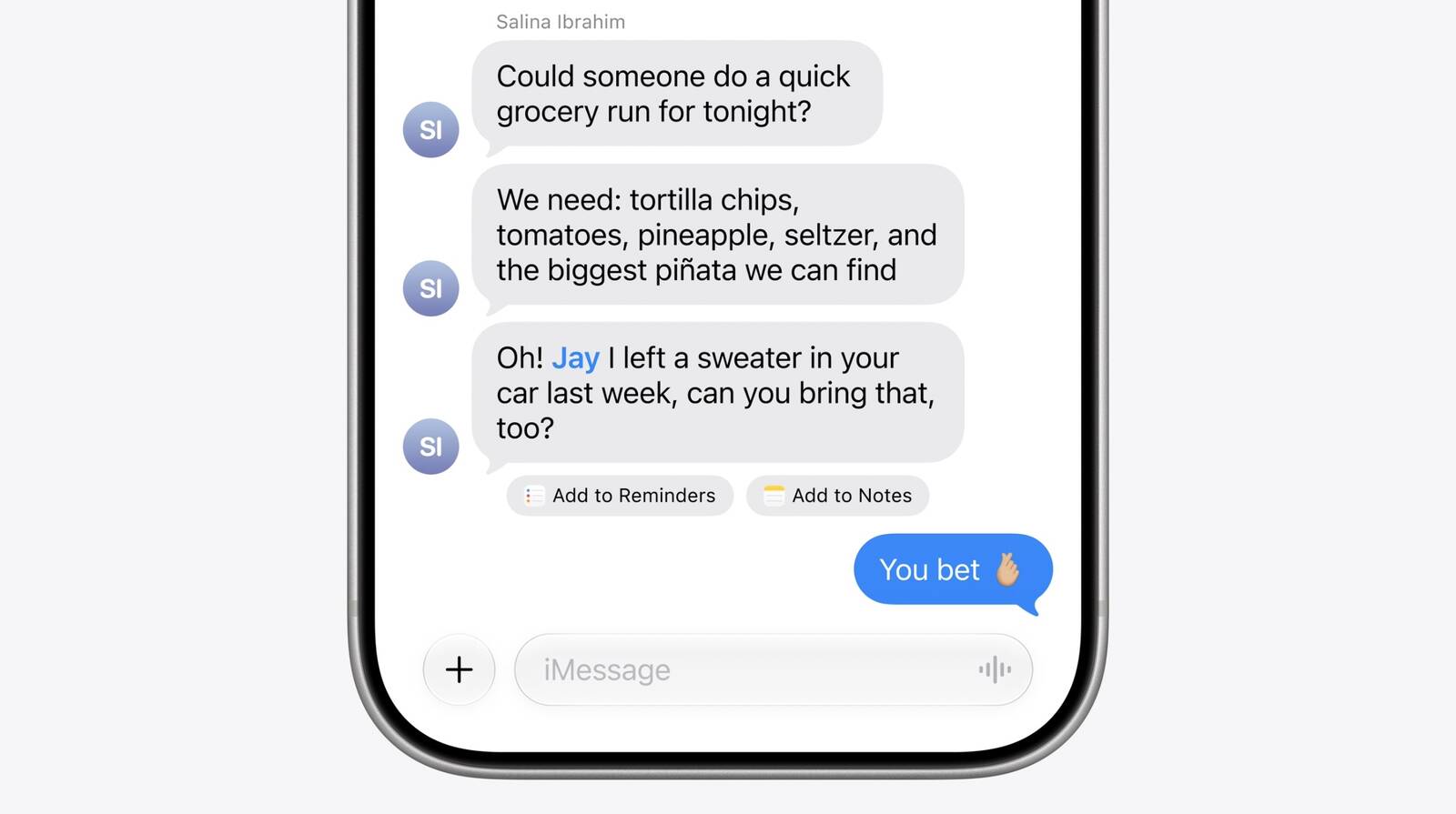
Messages in iOS 27 can also detect when a conversation is the kind that naturally leads to a follow-up action. If you are making plans with someone or agreeing to a task, the app can recognize that a reminder or note might be helpful and offer a quick shortcut to create one — all without requiring you to leave the thread. This tight integration between Messages, Reminders, and Notes reduces the friction of turning conversations into actionable items, something that has long required users to manually copy and paste information between apps.
Drawing Tools in Messages
Apple is also bringing drawing tools directly into Messages, allowing users to create and share hand-drawn sketches within conversations. While Digital Touch has existed in a limited form on Apple Watch for years, this new implementation brings a more accessible and expressive drawing experience to iPhone and iPad users inside the main Messages interface.
Performance and Reliability Improvements
Beyond the new intelligence features, Apple has invested heavily in the foundational performance of Messages. These are the kinds of improvements that may not generate excitement in a keynote presentation but will absolutely be noticed by anyone who has struggled with slow load times, inconsistent syncing, or cluttered conversation threads.
Faster Message Loading
Large conversations — especially ones with years of history and thousands of photos, videos, and links — have historically been slow to load and scroll through in Messages. Apple says iOS 27 addresses this directly, with significant improvements to how the app handles and renders long conversation threads. Users with long-running group chats or years of messages stored on their devices should notice a meaningful difference in responsiveness.
Improved Syncing Across Devices
For users who move between an iPhone, iPad, Mac, Apple Watch, and Vision Pro throughout the day, inconsistent message syncing has been a persistent frustration. iOS 27 brings improvements to how Messages, read states, reactions, and attachments sync across all of these devices, with Apple promising that the process will be both faster and more reliable. Read receipts that fail to update across devices, or attachments that appear on one device but not another, should become far less common.
Finding and Previewing Offloaded Media
Two related improvements address media that has been offloaded from local storage to iCloud. First, the Messages search function can now surface photos and videos that are stored in iCloud rather than on the device itself, meaning you no longer have to worry about whether a file is local before searching for it. Second, offloaded media now displays visible preview thumbnails directly in the conversation, so you can see what a photo or video is before deciding to download it. Together, these changes make iCloud offloading far less disruptive to the Messages experience.
Why This Approach to iOS 27 Matters
Apple's decision to prioritize refinement over novelty in iOS 27 reflects a growing awareness that users care as much about the quality of existing features as they do about new ones. Messages is one of the most-used apps on any iPhone, and even small improvements to its speed, reliability, and intelligence have an outsized impact on daily life.
The combination of Apple Intelligence features that genuinely reduce friction — like content-aware photo suggestions and smart reminder shortcuts — with foundational performance improvements like faster loading and better syncing makes iOS 27 one of the most cohesive Messages updates Apple has shipped. Rather than adding features for the sake of a feature list, Apple appears to be asking a more useful question: what would make this app work better for the people who use it every single day?
If the improvements deliver on their promise, the answer in iOS 27 is: quite a lot.
When Can You Try the New Messages Features?
iOS 27 is currently available to developers as a beta and will be available in a public beta in the coming weeks. The final release is expected in the fall alongside new iPhone hardware. Users on iPhone devices compatible with iOS 27 will receive the update automatically, and most of the Messages improvements described here will be available to all users, with Apple Intelligence features requiring a compatible device.
As Apple continues to refine the beta builds over the summer, additional Messages improvements may be announced or discovered. For anyone invested in the Messages experience, iOS 27 is shaping up to be a release well worth the wait.